
Table of Contents
- Introduction
- What Mobile App Development Means
- Native, Cross-Platform, or Web App?
- Types of Mobile Apps
- Why Businesses Build Apps
- How an App Gets Built, Stage by Stage
- The Technology Behind Apps
- What an App Costs
- Choosing a Development Team
- Mistakes That Kill Apps
- FAQs
- Conclusion
Introduction
Pick up any phone and look at the home screen. Banking, food, rides, messaging, shopping. Most of what people do every day now happens inside an app, and businesses have noticed. Customers expect an app, or at least a mobile experience that doesn’t feel like a shrunken website.
But building one isn’t as simple as hiring a developer and waiting. Plenty of apps get launched, downloaded twice, and forgotten. The ones that last usually have a clear purpose, a sensible budget, and a team that understood the users before writing any code. If you’re also weighing up tools for your business, the guides on the Multi Software homepage can help you compare options. And since an app is only as good as the data behind it, our Backup Software category is worth a look before you launch.
In this guide I’ll walk through what mobile app development involves, the main ways to build an app, how the process runs, what it costs, and the mistakes that sink projects.

What Mobile App Development Means
Mobile app development is the process of designing, building, testing, and maintaining software that runs on phones and tablets. Mostly that means two platforms: Android and iOS. Each has its own rules, its own app store, and its own audience.
It sounds like one job, but it’s really several. Someone designs how the app looks and feels. Someone writes the code you see on screen. Someone builds the server side, where accounts, payments, and data live. And someone tests everything on actual devices, because an app that works on one phone can break on another.
Why Two Platforms Make It Tricky
Android runs on thousands of different devices with different screen sizes and hardware. iOS runs on a small, controlled range of Apple devices. So Android apps need more testing variety, while iOS apps have to pass stricter store reviews. Neither is harder in every way, but they’re different enough that your plan has to account for both.
Native, Cross-Platform, or Web App?
This is the first big decision, and it affects cost, speed, and quality.
| Native | Cross-platform | Web app (PWA) | |
|---|---|---|---|
| Built with | Swift/Kotlin | Flutter, React Native | HTML, CSS, JavaScript |
| Performance | Best | Very good | Good |
| Cost | Highest | Medium | Lowest |
| Speed to build | Slowest | Faster | Fastest |
| Device features | Full access | Most access | Limited |
| Needs app store | Yes | Yes | No |

Native Apps
A native app is built separately for each platform, using the language Apple or Google recommends. You get the smoothest performance and full access to things like the camera, sensors, and notifications. The price is building and maintaining two codebases.
Cross-Platform Apps
With tools like Flutter or React Native, one codebase produces both an Android and an iOS app. You save time and money, and for most business apps, users can’t tell the difference. The exception is anything graphics-heavy or hardware-heavy, like a demanding game.
Progressive Web Apps
A PWA is a website that behaves like an app. It opens from a home-screen icon, works partly offline, and needs no store download. It’s the cheapest route, but it can’t do everything a real app can, especially on iPhones.
My honest view: if you’re a small business with a limited budget, cross-platform is usually the best starting point.
Types of Mobile Apps
Apps also differ by what they do:
- Consumer apps such as shopping, food delivery, fitness, and social platforms.
- Business apps for sales teams, field staff, and internal workflows.
- Utility apps like scanners, converters, and file tools. If you need document work on the go, our PDF Editor category shows the kinds of tools people rely on.
- Games, which have their own engines and very different budgets.
- Educational apps for lessons, quizzes, and tutoring.
- Service apps for banking, telemedicine, and booking.
Knowing which category you’re in shapes everything from design to pricing.
Why Businesses Build Apps
A website reaches people when they go looking. An app lives on their phone and can reach them directly. That difference is the whole appeal.
Direct contact. Push notifications let you tell customers about an order status, a sale, or a reminder without paying for ads each time.
Better experience. Apps load faster and feel smoother than most mobile sites. They can also use the phone’s camera, location, and sensors.
Loyalty. Someone who has your app installed is far more likely to come back.
Useful data. An app shows you what people tap, where they drop off, and what they ignore. That’s information you can act on.
Efficiency inside the company. Internal apps for staff replace paper forms, long email chains, and phone calls.
None of this is automatic, though. An app helps only when it solves a real problem better than the alternatives do.
How an App Gets Built, Stage by Stage
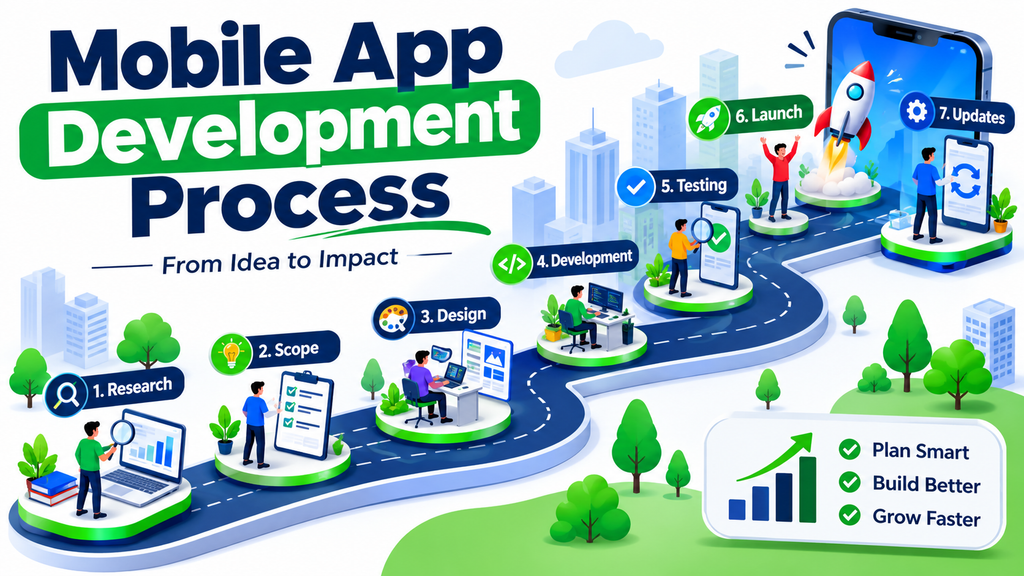
Good teams follow a steady sequence. Skipping stages is how budgets get blow
Idea and Research
Before anything else, work out who the app is for and what problem it solves. Look at competitors. Find out what their users complain about. Those complaints are your opportunity.
Planning the Scope
Decide which features go into the first version. Be strict. Every extra feature adds cost and delay. Most successful apps launched with a small core and grew from there.
Design
Designers create wireframes, then polished screens, then clickable prototypes. Show the prototype to a handful of real users. Ten minutes of watching someone get confused can save you weeks of rework.
Development
Developers build the front end, the back end, and the connections between them. Most teams work in short sprints and show you progress every couple of weeks, so problems surface early instead of at the end.
Testing
Testers check the app on different phones, screen sizes, and network speeds. They look for crashes, slow screens, broken buttons, and security holes. Don’t treat this as optional. App store reviews are public, and bad ones stick.
Launch
The team prepares store listings, screenshots, descriptions, and privacy information, then submits the app for review. Apple and Google can reject apps, sometimes for small reasons, so leave extra time.
After Launch
The work doesn’t stop. New phone updates break things, users ask for features, and bugs appear. Plan for regular updates and keep backups of your app data and code, so one bad day doesn’t erase months of work.
The Technology Behind Apps
You don’t need to be technical, but a little vocabulary helps when talking to developers.
- Front end: the screens users see. Built with Swift (iOS), Kotlin (Android), or a cross-platform tool like Flutter or React Native.
- Back end: the server, database, and logic. Common choices include Node.js, Python, and cloud services from Amazon, Google, or Microsoft.
- APIs: the messengers that let the app talk to the server and to other services such as payment gateways and maps.
- Cloud hosting: where the back end lives, so it can handle more users as you grow.
- Analytics: tools that show how people use the app.
Ask your team why they chose their stack. A good answer is about your needs, not their personal favorites.
What an App Costs
I wish I could give you one number. I can’t, and neither can anyone honest.
The main price drivers are the number of features, design complexity, platforms covered, back-end work, third-party integrations, and where the team is based. Roughly speaking, a simple app might cost a few thousand dollars, a mid-sized business app can reach tens of thousands, and a complex app with live data, payments, and chat can go much higher.
Don’t forget the running costs. Servers, store fees, updates, and support continue after launch, and many owners forget to budget for them.
Ways to keep costs sensible:
- Launch a minimum viable product with only the core features.
- Choose cross-platform unless you truly need native performance.
- Fix requirements before development starts.
- Get a detailed, itemized quote, not a lump sum.
Choosing a Development Team
Your team will shape the result more than any technology choice does.
Look at apps they’ve actually shipped and download a few. Do they feel smooth? Read independent reviews rather than the testimonials on their own site. Notice how fast and how clearly they answer your questions, because communication rarely gets better after you sign.
Ask who owns the source code. The contract should say you do. Ask how they protect your users’ data, too. Privacy matters even more for apps than for websites, since people hand over personal details freely. It’s the same attitude we take on our own Privacy Policy page.
And resist picking the cheapest quote. Compare what’s included: testing, documentation, store submission, and post-launch support.
Mistakes That Kill Apps
No clear problem. “An app for my business” isn’t a purpose. “An app that lets customers reorder in two taps” is.
Too many features at launch. More features mean more bugs and more delay. Start small.
Ignoring user feedback. Your opinion isn’t your user’s opinion. Test early.
Skipping marketing. Stores contain millions of apps. Without a plan to get downloads, even a great app stays invisible.
Weak onboarding. Most people decide within a minute whether an app is worth keeping. Make that first minute easy.
No maintenance budget. Apps age quickly. Plan for updates from the start.
FAQs
How long does it take to build a mobile app?
A simple app takes about two to four months. A more complex one can take six months or longer. Features and platforms are the biggest factors.
Should I build for Android, iOS, or both?
Check where your customers are. If you can’t tell, a cross-platform build covers both without doubling the cost.
How much does a mobile app cost?
It ranges from a few thousand dollars for a simple app to six figures for a complex one. Ask for an itemized estimate.
Do I need an app, or is a website enough?
If your customers just need information, a good mobile website may do. If you want direct contact, offline use, or device features, an app makes more sense.
What is an MVP?
A minimum viable product is a basic first version with only the key features. It lets you test your idea cheaply before investing more.
Who owns the app after it’s built?
That depends on your contract, so make sure it clearly says you own the code and design files.
Will I need other software too?
Often, yes. Everyday utilities like document editors are cheaper to buy than to build. You can browse reviewed options in our PDF Editor category.
Conclusion
A mobile app can bring you closer to your customers, make your team more efficient, and open up new revenue. But it only works when it solves a real problem, launches in a sensible size, and keeps getting attention after release.
So start with the problem, not the technology. Pick a team you trust, begin with a small version, listen to your first users, and budget for the long haul. For everyday needs that don’t justify a build, ready-made tools are still the practical choice, and you can compare reviewed ones on the Multi Software homepage.
